


Download Studioline Photo Basic – Digital Photo Editor, Image Management, Free Photo Tool
Overview
Studioline Photo Basic, developed by H&M, is a digital photo editing and management solution designed to help photographers and casual users organize, enhance, and share their image collections efficiently. The app provides a centralized database for storing and managing digital photos, making it easier to handle growing libraries of snapshots. It supports image import from various devices such as cameras and scanners, and accommodates popular file formats, ensuring broad compatibility with existing workflows. This functionality addresses common challenges related to disorganized digital photo archives and the need for accessible, reliable editing tools.
The target audience includes amateur photographers, content creators, and individuals seeking a free yet powerful alternative to commercial photo software. While H&M is primarily known for fashion retail, the developer has extended its digital offerings into productivity tools, indicating a strategic move toward software-based customer engagement. The app's purpose is to streamline the entire photo lifecycle—from import and organization to editing and presentation—within a single interface.
Real-world use cases include organizing family photo albums, preparing images for personal or professional presentations, and creating web galleries for online sharing. In the broader app ecosystem, Studioline Photo Basic stands out as a no-cost solution that bridges the gap between basic image viewers and high-end photo editing suites. Its inclusion of metadata tagging, red-eye correction, and slideshow creation adds significant value for users who want more than just a simple viewer.
Key Features & Functionality
- Centralized Image Database: The app allows users to import and store images from cameras, scanners, and other devices into a unified library. This enables efficient long-term management of digital photo collections.
- Metadata and Keyword Tagging: Users can assign keywords, descriptions, and access EXIF data directly within the app. This feature supports advanced search capabilities, allowing users to retrieve specific images based on content, date, or location.
- Red-Eye and Color Correction Tools: Built-in editing features include red-eye removal and color adjustments, essential for improving image quality without requiring external software.
- Slideshow Creation: Users can create dynamic presentations with transitions, background music, and visual effects, ideal for sharing memories or showcasing work.
- Web Gallery Generation: The app supports exporting photo collections as interactive web galleries, enabling easy online sharing with friends, clients, or social media audiences.
- Interactive Tutorials and Help Resources: Onboard guidance, tool tips, and online help are available to assist users in navigating the interface and mastering core functions.
For example, a user preparing a wedding photo album can import all images, tag them by couple name and event timeline, correct color balance, and generate a slideshow with music for a presentation. Similarly, a small business owner could use the web gallery feature to display product images on their website without needing web design skills.
Interface, UX & Performance
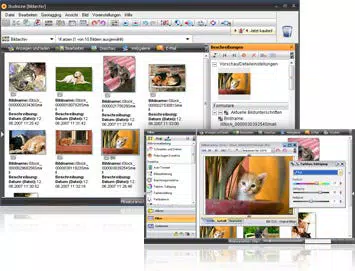
Studioline Photo Basic features a three-pane Windows interface, designed for intuitive navigation and streamlined access to core functions. The layout separates image browsing, editing tools, and metadata management into distinct sections, reducing cognitive load and enhancing workflow efficiency. Visual design emphasizes clarity and functionality over decorative elements, aligning with its utility-focused purpose.
Navigation is consistent across the app, with logical grouping of tools and clear labeling. The dialog-based controls ensure that even users with limited technical experience can perform edits confidently. Although the developer did not list formal performance metrics, the app is reported to run smoothly on Windows Vista and Windows 7, suggesting optimized resource usage for its target environment.
Responsiveness appears to be reliable during typical operations such as image import, tagging, and slideshow creation. Stability is supported by the availability of free registration, which grants access to updates—indicating ongoing maintenance. However, specific requirements for performance on different device categories were not listed, and compatibility beyond the stated OS versions remains unspecified.
Platform Compatibility & Technical Requirements
Studioline Photo Basic is designed for Windows operating systems, specifically supporting Windows Vista and Windows 7. The app’s file size is not disclosed in the provided information, but its functionality suggests it is optimized for desktop environments with moderate hardware specifications.
The developer did not specify minimum OS requirements or system compatibility beyond the listed versions. As such, users on newer Windows versions (e.g., Windows 10 or 11) may encounter compatibility issues unless the software has been updated through official channels. The absence of an Android or iOS version implies that this is a desktop-only application, limiting its accessibility to mobile users.
Pros and Cons
- Free to use with no hidden costs
- Comprehensive image management with metadata tagging
- Integrated editing tools including red-eye and color correction
- Supports slideshow and web gallery creation
- User-friendly interface with onboarding assistance
- Available for Windows Vista and Windows 7
- Not available on mobile platforms (Android/iOS)
- Support limited to older Windows versions
- Developer did not provide detailed system requirements
- No information on update frequency or long-term maintenance
- File size and version details not disclosed
FAQ
Is Studioline Photo Basic safe to download and install?
Yes, the app is distributed as freeware and does not include malware or intrusive ads. However, users should only download from official or trusted sources to ensure authenticity.
Can I use Studioline Photo Basic on Windows 10 or Windows 11?
The app officially supports Windows Vista and Windows 7. Compatibility with newer Windows versions is not confirmed and may require compatibility mode or testing.
Does Studioline Photo Basic offer cloud storage or sync features?
There is no information indicating cloud integration or file syncing. All image management occurs locally on the user’s device.
Are updates free after registration?
Yes, free registration grants access to updates, ensuring users can benefit from bug fixes and potential feature improvements.
Is the app suitable for professional photographers?
While the app includes tools useful for basic to intermediate editing, its limited OS support and lack of advanced features like RAW processing suggest it is better suited for casual or semi-professional use.
Final Thoughts
Studioline Photo Basic offers a compelling value proposition for users seeking a free, feature-rich photo management and editing tool. Its ability to centralize image collections, support metadata tagging, and generate slideshows and web galleries makes it a practical choice for organizing and presenting digital photos. The inclusion of user-friendly assistance and a clean interface enhances accessibility for beginners, while core editing tools provide enough depth for intermediate users.
However, its reliance on older Windows versions and absence of mobile support limit its reach in today’s multi-device environment. For users still running Windows Vista or Windows 7, this app remains a viable option. Those on modern systems may need to explore alternative tools or test compatibility carefully.
Download Studioline Photo Basic now


